
US-Based Distributor
Wellington, Florida — serving US businesses, agencies & OEMs.
Send a Part Number
Search or send your list — obsolete & current GE Speedtronic, boards & controls.
24-Hour Quotes
US-based specialists reply within 24 hours.
Purchase Orders Welcome
POs accepted from qualified US buyers; cards too.


Secure & Protected • Purchase Orders Accepted

Genuine Products • Guaranteed Compatibility

Description
Cloud Ninjas' Dell PowerEdge R530 Specifications
Chassis
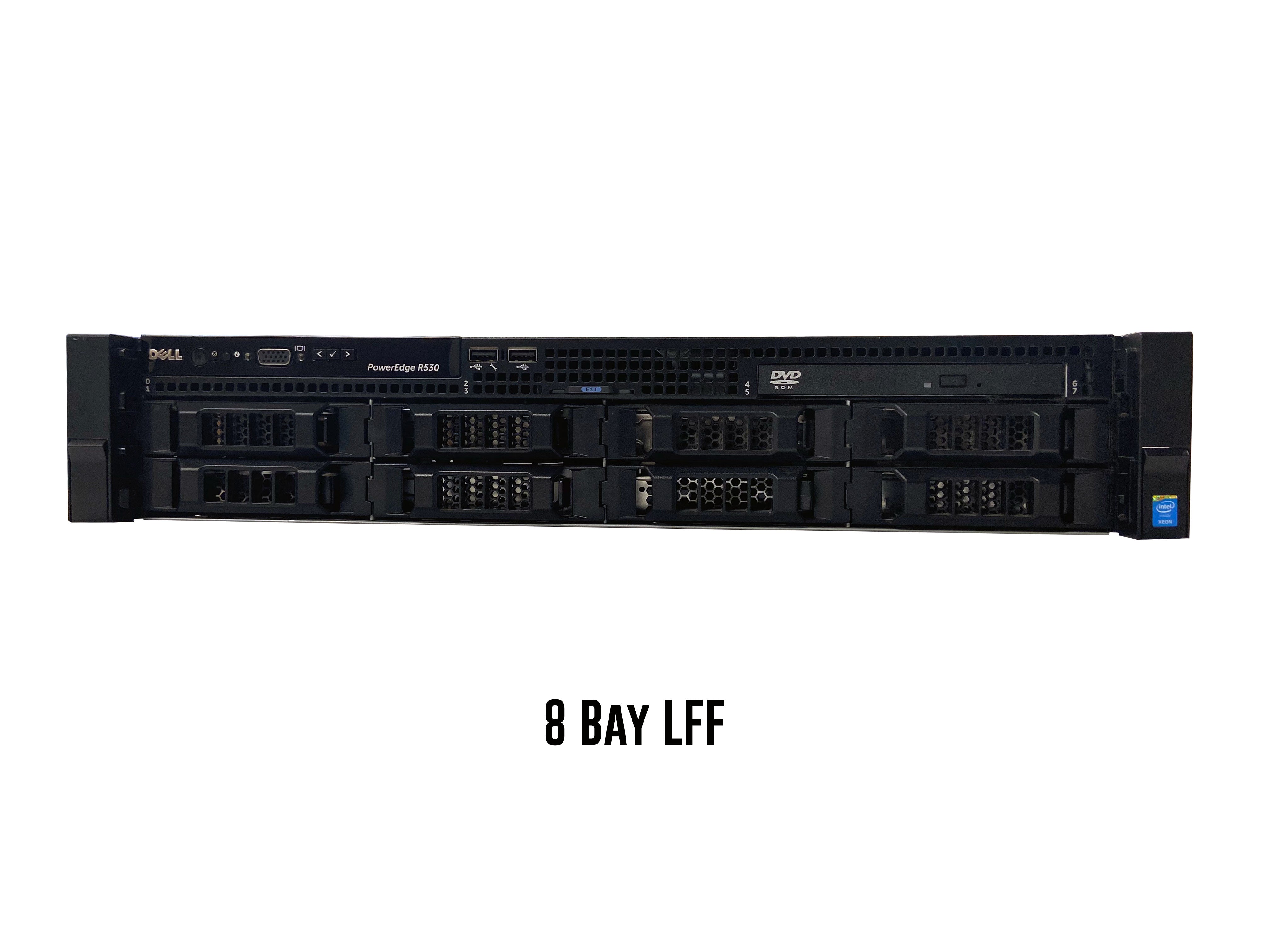
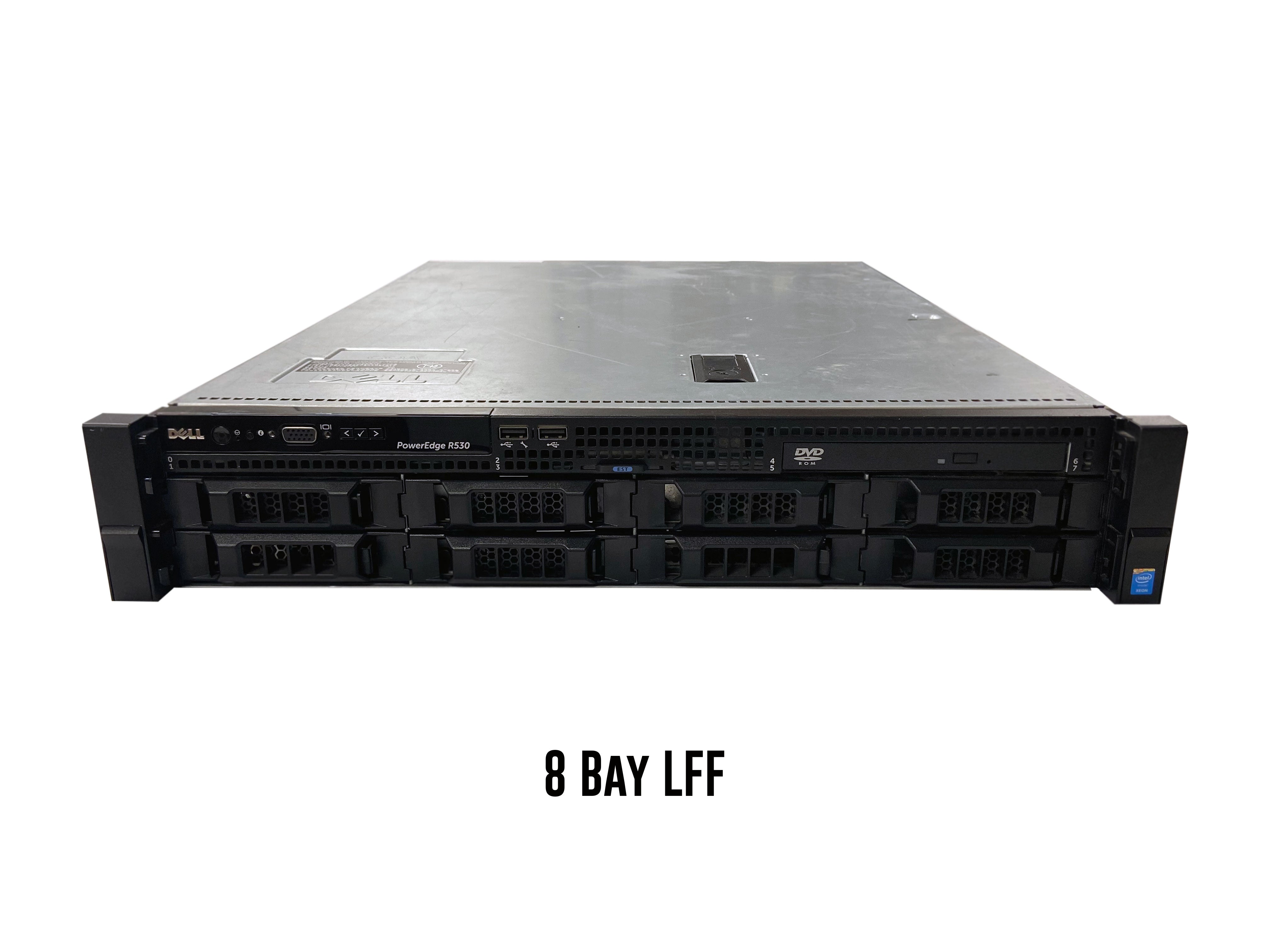
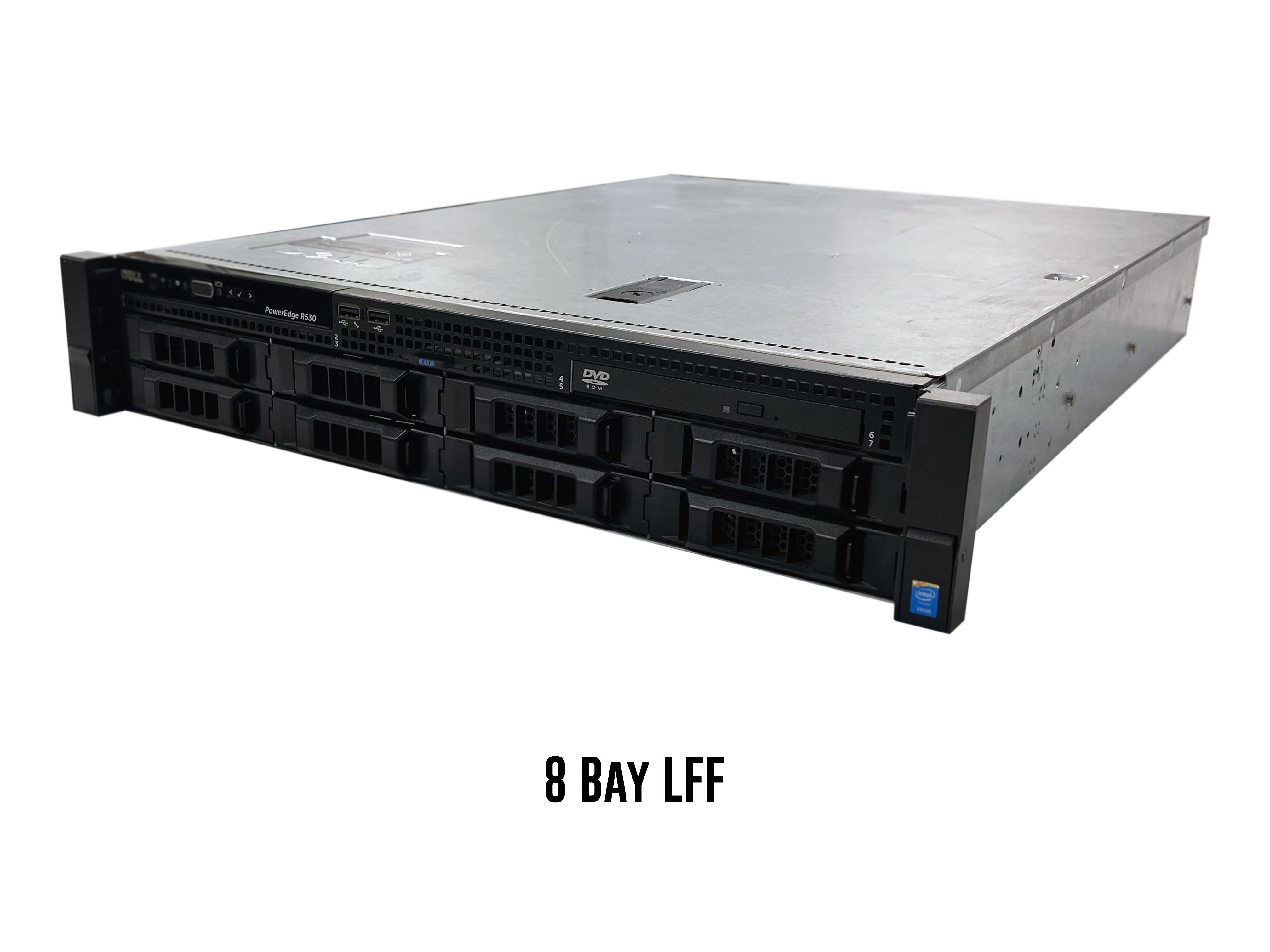
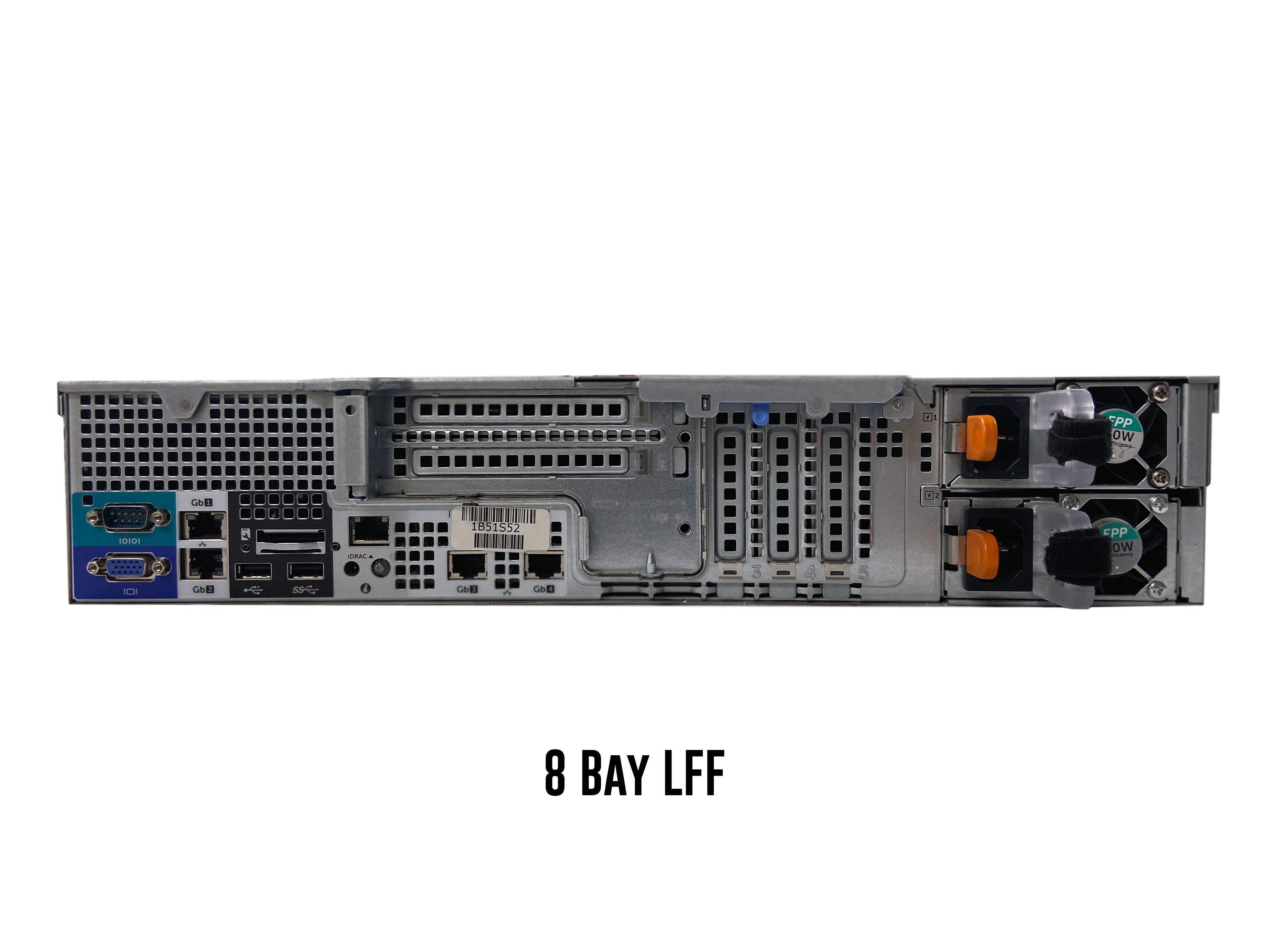
Unlike some of the other systems in Dell’s 13th generation server line up, the PowerEdge R530 only has one chassis option. The R530 supports hot-swap, which means that drives can be added or removed while the server is on. This single chassis option is the 8 Bay LFF.
8 Bay LFF Hot-swap
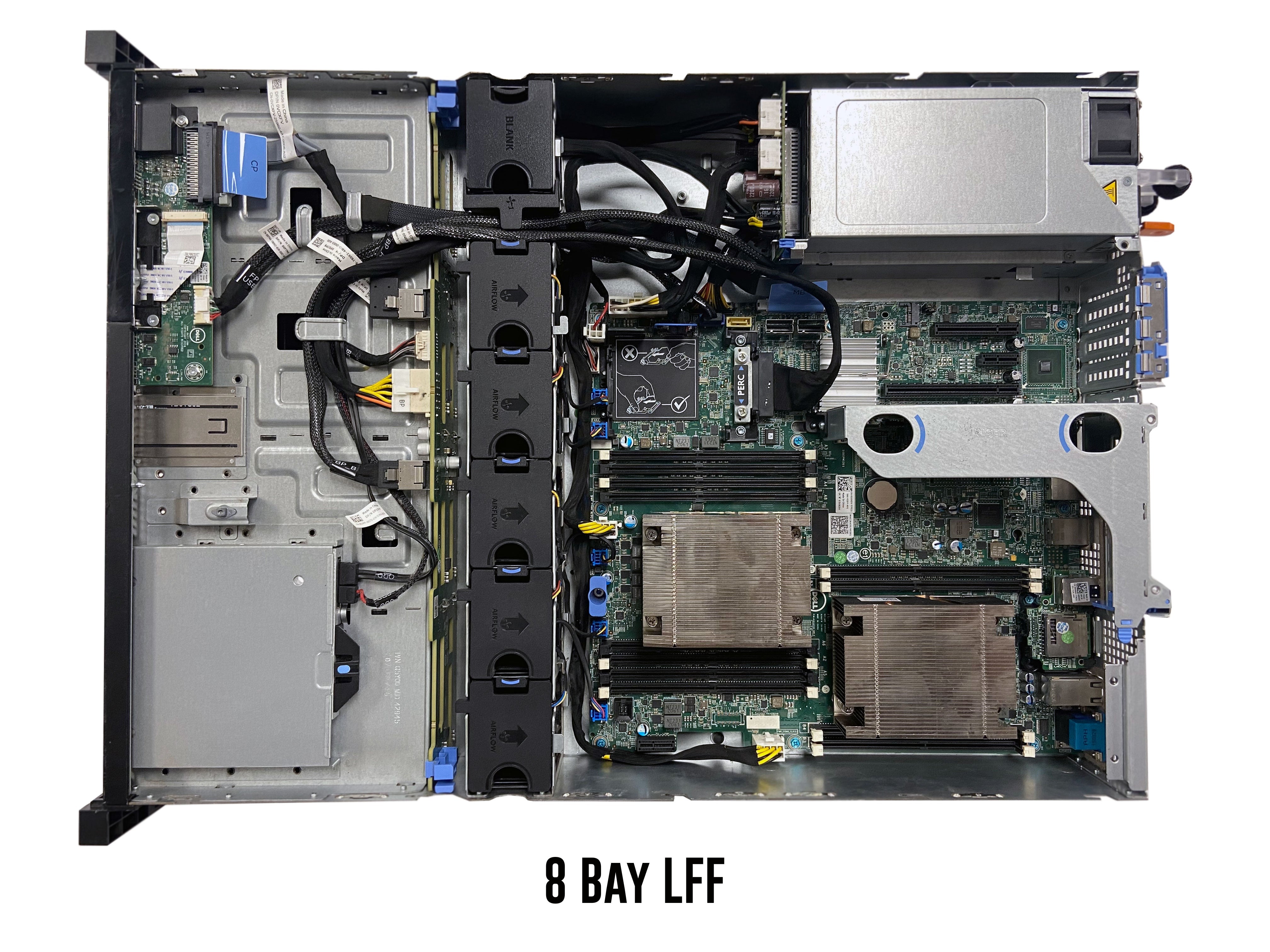
As stated above, the 8 Bay LFF chassis is the only option for the PowerEdge R530. This chassis supports a total of 8 3.5” SAS, SATA, or SSD drives. This system is a dual processor system and has an LGA2011-3 socket. There is a total of 12 DIMM slots with CPU 1 controlling 8 slots and CPU 2 controlling 4 slots. One of the things that set the R530 apart from other systems in the 13th generation is that there is a built in 4 x 1GbE NIC. There is option to use a daughter network cards, so the only option is to use PCIe NICs. There is also a removable card for iDRAC. The motherboard includes an one x1, one x4, one x8, and two x16 PCIe slots. All slots, except for the right two slots, accept half height PCIe cards. There is one x16 PCIe riser which consist of an x8 and an x16 PCIe slot. Each slot on the riser accepts full height cards.
Processing Power
The Dell PowerEdge R530 server can handle a maximum of 22 cores per processor. The R530 has two LGA2011-3 CPU sockets, which means that this system utilizes Intel Xeon E5-2600 v3 or E5-2600 v4 series of processors. These two series of processors have support for virtualization.
Intel Xeon E5-2600 v3 Series Processors
| CPU | Step Code | Cores | Frequency |
|---|---|---|---|
| E5-2603v3 | SR20A | 6 | 1.60 GHz |
| E5-2608Lv3 | SR21P | 6 | 2.00 GHz |
| E5-2609v3 | SR1YC | 6 | 1.90 GHz |
| E5-2618Lv3 | SR200 | 8 | 2.30 GHz |
| E5-2620v3 | SR207 | 6 | 2.40 GHz |
| E5-2623v3 | SR208 | 4 | 3.00 GHz |
| E5-2628Lv3 | SR1XZ | 10 | 2.00 GHz |
| E5-2630v3 | SR206 | 8 | 2.40 GHz |
| E5-2630Lv3 | SR209 | 8 | 1.80 GHz |
| E5-2637v3 | SR202 | 4 | 3.50 GHz |
| E5-2640v3 | SR205 | 8 | 2.60 GHz |
| E5-2643v3 | SR204 | 6 | 3.40 GHz |
| E5-2648Lv3 | SR1XW | 12 | 1.80 GHz |
| E5-2650v3 | SR1YA | 10 | 2.30 GHz |
| E5-2650Lv3 | SR1Y1 | 12 | 1.80 GHz |
| E5-2658v3 | SR1XV | 12 | 2.20 GHz |
| E5-2658Av3 | SR27T | 12 | 2.90 GHz |
| E5-2660v3 | SR1XR | 10 | 3.30 GHz |
| E5-2667v3 | SR203 | 8 | 3.20 GHz |
| E5-2670v3 | SR1XS | 12 | 2.30 GHz |
| E5-2680v3 | SR1XP | 12 | 2.50 GHz |
| E5-2683v3 | SR1XH | 14 | 2.00 GHz |
| E5-2690v3 | SR1XN | 12 | 2.60 GHz |
| E5-2695v3 | SR1XG | 14 | 2.30 GHz |
| E5-2697v3 | SR1XF | 14 | 2.60 GHz |
| E5-2698v3 | SR1XE | 16 | 2.30 GHz |
| E5-2699v3 | SR1XD | 18 | 2.30 GHz |
Intel Xeon E5-2600 v4 Series Processors
| CPU | Step Code | Cores | Frequency |
|---|---|---|---|
| E5-2603v4 | SR2P0 | 6 | 1.70 GHz |
| E5-2608Lv4 | SR2P9 | 8 | 1.60 GHz |
| E5-2609v4 | SR2P1 | 8 | 1.70 GHz |
| E5-2618Lv4 | SR2PE | 10 | 2.20 GHz |
| E5-2620v4 | SR2R6 | 8 | 2.10 GHz |
| E5-2623v4 | SR2PJ | 4 | 2.60 GHz |
| E5-2628Lv4 | SR2NC | 12 | 1.90 GHz |
| E5-2630Lv4 | SR2P2 | 10 | 1.80 GHz |
| E5-2630v4 | SR2R7 | 10 | 2.20 GHz |
| E5-2637v4 | SR2P3 | 4 | 3.50 GHz |
| E5-2640v4 | SR2NZ | 10 | 2.40 GHz |
| E5-2643v4 | SR2P4 | 6 | 3.40 GHz |
| E5-2648Lv4 | SR2ND | 14 | 1.80 GHz |
| E5-2650Lv4 | SR2N8 | 14 | 1.70 GHz |
| E5-2650v4 | SR2N3 | 12 | 2.20 GHz |
| E5-2658v4 | SR2NB | 14 | 2.30 GHz |
| E5-2660v4 | SR2N4 | 14 | 2.00 GHz |
| E5-2667v4 | SR2P5 | 8 | 3.20 GHz |
| E5-2680v4 | SR2N7 | 14 | 2.40 GHz |
| E5-2683v4 | SR2JT | 16 | 2.10 GHz |
| E5-2687Wv4 | SR2NA | 12 | 3.00 GHz |
| E5-2690v4 | SR2N2 | 14 | 2.60 GHz |
| E5-2695v4 | SR2J1 | 18 | 2.10 GHz |
| E5-2697Av4 | SR2K1 | 16 | 2.60 GHz |
| E5-2697v4 | SR2JV | 18 | 2.30 GHz |
| E5-2698v4 | SR2JW | 20 | 2.20 GHz |
| E5-2699v4 | SR2JS | 22 | 2.20 GHz |
| E5-2699Rv4 | SR31X | 22 | 2.20 GHz |
| E5-2699Av4 | SR30Y | 22 | 2.40 GHz |
Memory
DIMM Slots & Channels
The Dell PowerEdge R530 Server has a total of 12 DDR4 DIMM slots. There are 8 total memory channels. The memory channels by CPU 1 consist of 2 DIMM slots per channel. The channels by CPU 2 have 1 DIMM slot per channel.
Memory Types & Module Capacities
The R530 accepts DDR4 memory and can take either ECC Registered memory (RDIMM) or Load Reduced memory (LRDIMM). It is important to note that you cannot mix different types of memory. You can only use one type throughout all DIMM slots. The R530 accepts memory capacities of 4GB, 8GB, 16GB, 32GB, and 64GB. With 64GB modules, you can only use this with load reduced memory. With this said, using load reduced memory allows you to reach an overall greater RAM capacity.
Max Configurations
With ECC Registered memory, a max size of 384GB can be achieved with a configuration of 24 32GB modules. With Load Reduced, you can reach a max of 768GB of RAM using 24 64GB modules.
Supported Memory Speeds
The R530 server accepts memory speeds of 2133MT/s and 2400MT/s. You can technically put in 2666MT/s, 2933MT/s or 3200MT/s, but these will clock down to 2400MT/s when using a E5-2600 v4 processor. When using an E5-2600 v3 processor, the fastest memory speed you can achieve is 2133MT/s.
Storage
The PowerEdge R530’s form factor only accepts a total of eight 3.5” drives. The R530 accepts SAS, SATA, and SSD drives. This server’s chassis does support hot-swap drives, meaning you can remove and/or add drives while the machine is powered on.
Supported Drives
| Type | Max Capacity (Per Drive) 3.5" | Speeds |
|---|---|---|
| SAS | 12 TB | 10k or 15k |
| SATA | 12 TB | 7.2k |
| SSD | 7.68 TB | 3 GB/s, 6 GB/s, 12 GB/s |
NVMe Options & Upgrades
NVMe is a fairly new technology in today’s world of computers. NVMe brings major speed advantages to your systems. NVMe drives are much faster than traditional drives. Unfortunately, the PowerEdge R530 doesn’t have much in terms of NVMe support. There is only really one option which is: PCIe. Neither U.2 or M.2 will work with this system.
PCIe NVMe
The only NVMe option for the R530 server is to use a PCIe NVMe drive. With this said, it isn’t the greatest solution. Firstly, you are restricted with which PCIe NVMe drives you can use. The drive you use must have Dell firmware. A normal OEM PCIe NVMe drive such an Intel or Samsung will not work. Even if you have a PCIe NVMe drive with Dell firmware, there are still a lot of limitations. You cannot use this drive to install an OS or to create a virtual machine. This option can really only be used as additional storage. One important thing to check is to make sure that the Slot disablement setting in the BIOS is enabled. If it is disabled, then the drive will not be recognized.
Power Supplies
How Many Power Supplies does the R530 Take?
The Dell PowerEdge R530 Server can hold a maximum of two hot-swap power supplies. Because the power supplies are hot-swap, you can remove one from the system while the server is powered on. This will only work if one power supply remains plugged in.
Wattage Options
The R530 server has three power supply wattage options: 495W, 750W, and 1100W. All three options are great choices, but which one you choose depends on your application. Systems that have high end components generally require more power. Also, if the system is performing resource intensive tasks, then there will be more of a demand for power. In both cases, going with a 750W or 1100W PSU is the way to go.
Voltage
An important thing to pay attention to when buying a power supply for you R530, is the voltage. R530 power supplies can be either 110V or 220V. If you purchase a 220V power supply, but only have a 110V connection, then the system will not power on. Most outlets in American homes are equipped with 110V connections, while homes in Europe use 220V connections. 220V connections are also commonly seen in data centers. Before purchasing a power supply for your server, find out what connection you need, and then make sure the PSU you purchase supports that connection.
RAID Options
| RAID Options | RAID Levels | Cache | Drive Speeds | PCIe Generation | RAID Hardware |
|---|---|---|---|---|---|
| S130 onboard software | 0,1,5,10 | None | 6 Gb/s SATA 12 Gb/s SAS |
PCIe 3.0 | Software |
| HBA330 Passthrough | Passthrough | None | 6 Gb/s SATA 12 Gb/s SAS |
PCIe 3.0 | Hardware |
| H330 Mini Mono | 0,1,5,10,50 | None | 6 Gb/s SATA 12 Gb/s SAS |
PCIe 3.0 | Hardware |
| H730 Mini Mono | 0,1,5,6,10,50,60 | 1GB | 6 Gb/s SATA 12 Gb/s SAS |
PCIe 3.0 | Hardware |
| H730p Mini Mono | 0,1,5,6,10,50,60 | 2GB | 6 Gb/s SATA 12 Gb/s SAS |
PCIe 3.0 | Hardware |
| H830 PCIe Adapter | 0,1,5,6,10,50,60 | 2GB | 6 Gb/s SATA 12 Gb/s SAS |
PCIe 3.0 | Hardware |
Network Interface Card Options
One thing that sets the Dell PowerEdge R530 apart from most servers in the 13th generation line up is it’s 4 x 1GbE RJ45 integrated network card. This system does not have a slot for network daughter card, so, the only way to expand the R530’s networking capabilities is by using PCIe network cards. There are both ethernet and fiber options. Since the built in NIC ports have 1 gigabit speeds, it is recommended that you go with an option with 10 gigabit speeds when picking out a PCIe network card for your R530.
| Network Card Options |
| Dell Broadcom 5719 Quad-Port 4 x 1GbE RJ45 NIC |
| Dell Broadcom 5720 Dual-Port 4 x 1GbE RJ45 NIC |
| Dell Broadcom 57810S Dual Port 2 x 10Gb DA/SFP+ Network Adapter |
| Dell Broadcom 57810S Dual Port 2 x 10GbE RJ45 Network Adapter |
| Dell Intel I350-T2 Dual Port 2 x 1GbE RJ45 Network Adapter |
| Dell Intel I350-T4 Quad Port 4 x 1GbE RJ45 Network Adapter |
| Dell Intel X520-DA2 Dual Port 2 x 10Gb DA/SFP+ Low Profile Network Adapter |
| Dell Intel X540-T2 Dual Port 2 x 10GbE RJ45 Network Adapter |
Systems Management Solutions
The Dell PowerEdge R530 Server utilizes the Integrated Dell Remote Access Controller 8 (iDRAC8), which allows you to easily manage your Dell server. The iDRAC8 web interface provides a variety of useful information and features, that make managing your Dell server an easy task. Features include, but are not limited to hardware monitoring, power control, remote console, control over system settings, firmware update control, storage management, and much more. You can access the iDRAC8 web interface, by setting the iDRAC IP in system setup, and searching the IP in a web browser.
Supported Operating Systems:
The PowerEdge R530 supports a wide variety of operating systems which ranges from different distributions of Linux, VMware, and Windows Server. These operating systems are:
- ⦿ Citrix XenServer 6.5
- ⦿ Citrix XenServer 7.0
- ⦿ Novell SuSE Linux ES 11
- ⦿ Red Hat® Enterprise Linux 6
- ⦿ Red Hat® Enterprise Linux 7
- ⦿ SUSE Linux ES 12
- ⦿ VMware ESXi 5.1
- ⦿ VMware ESXi 5.5
- ⦿ VMware ESXi 6.0
- ⦿ VMware ESXi 6.5
- ⦿ VMware ESXi 6.7
- ⦿ VMware ESXi 7.0
- ⦿ Window Server 2008 R2
- ⦿ Window Server 2012
- ⦿ Window Server 2012 R2
- ⦿ Window Server 2016
- ⦿ Window Server 2019 LTSC
Dell PowerEdge R530 Video
Related Products — You May Also Need
US-Based Distributor
Wellington, Florida — serving US businesses, agencies & OEMs.
Send a Part Number
Search or send your list — obsolete & current GE Speedtronic, boards & controls.
24-Hour Quotes
US-based specialists reply within 24 hours.
Purchase Orders Welcome
POs accepted from qualified US buyers; cards too.
Product
We always aim for make sure our customers love our products, but if you do need to return an order, we’re happy to help. Just email us directly and we’ll take you through the process.
Other
You can contact us through our contact page! We will be happy to assist you.
Any question?
If we still haven't answered your question, you can contact us below and we will get back to you as soon as possible.
WhatsApp +1 (305) 809-0110
info@alotechsolutions.com
Send a message
info@alotechsolutions.com